Detailed instructions for the four payment methods you can use to fund your TegasFX wallet. This tutorial covers the TegasFX-internal part — the steps on your bank's website, in your crypto wallet, or at Volet are external and intentionally not covered here.
Two important things upfront: (1) For bank transfers, the recipient is not TegasFX but Clover Markets Limited. This is correct — TegasFX is a registered trademark of Clover Markets Limited, which acts as the parent company and holds all DBS bank accounts. So you're transferring to the correct recipient. (2) For card payments and Apple/Google Pay, fees of 9 % plus $0.60 fixed cost apply — significantly more than the other methods. More on this in the comparison block below.
Important: USD wallet as target
TegasFX automatically creates two wallets — one in EUR, one in USD. Since the setup-investment for all Algovaro funded accounts is denominated in USD, deposit into the USD wallet. A deposit into the EUR wallet would have to be converted later with exchange fees. In the first wizard step, you can choose the target wallet from the Deposit To dropdown — pick the USD variant.
The TegasFX wizard at a glance
Whichever payment method you choose, the TegasFX deposit flow always runs in three steps:
Initial Information — choose the target wallet (USD wallet) and select the payment method from the four available tiles
Transfer Details — depending on the method: enter the amount, view the banking data or wallet addresses, enter card details, or open the Volet login
Confirmation — confirmation of the initiated transaction. For bank transfers and crypto, TegasFX waits for the funds to arrive; for cards and Volet, the booking is typically visible immediately
You reach the wizard via the red Deposit Funds button at the top right or via the left menu under Funds → Deposit Funds.
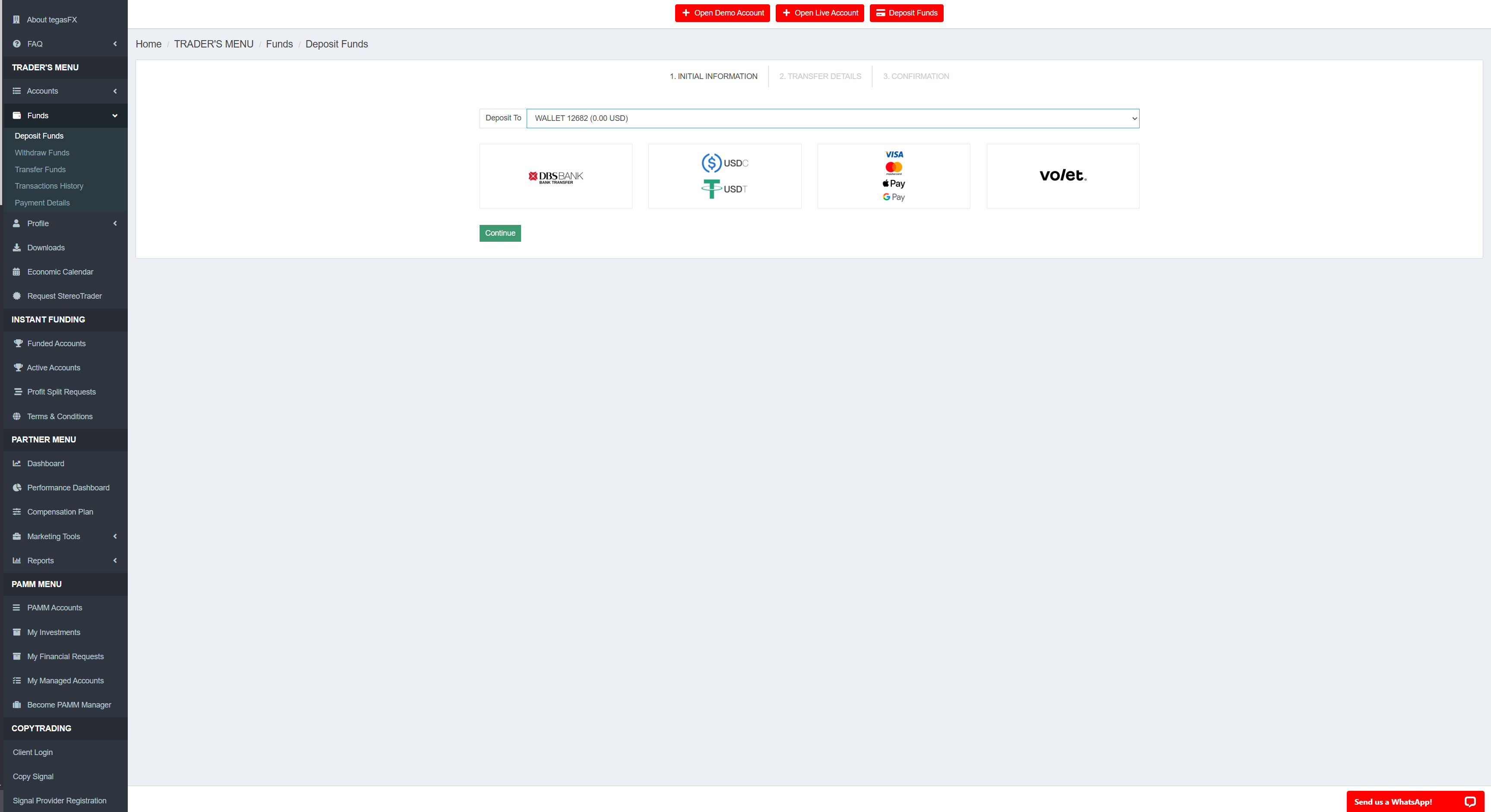
Step 1 (Initial Information) in the TegasFX deposit wizard. Four methods to choose from: DBS Bank Transfer, USDC/USDT, VISA/Mastercard/Apple Pay/Google Pay, and Volet. Pick the USD wallet as target in the dropdown above.
Methods compared — fees and limits
The TegasFX platform shows different minimum amounts and fee structures per method. Here are the values you'll see in the second wizard step:
Method
Minimum
Fee
Effective load
DBS Bank
$200
DBS fee: $0 + SWIFT fee from your bank
~$0–25 depending on your bank (0 with Wise/Revolut)
Crypto (USDC/USDT)
$10
1 %, min $2.50 + network fee from your wallet
1 % via TRC20/Polygon (higher via ERC20)
Card / Apple / Google Pay
$20
9.0 %, min $0.60 + fixed fee $0.60
~9.6 % markup (by far the most expensive)
Volet
$11.51
3.50 % Volet fee + 0.50 % transfer fee
~4.0 % markup
Card and Apple/Google Pay are expensive — concrete math
For a card deposit, TegasFX deducts 9 % plus $0.60 fixed cost directly from the deposited amount. Concretely:
Deposit $100 → $90.40 credited
Deposit $329 for a $299 setup-investment → only $298.71 in the wallet — not enough!
Deposit $330 → $299.70 in the wallet — just enough
In other words: anyone paying for a $299 setup-investment by card needs to deposit ~$330, that is roughly 10 % markup. With crypto it would be $302, with bank transfer essentially $299 plus any SWIFT fees from your bank. We only recommend card payment if no other method is available to you.
Algovaro recommendation by setup size:
Very small ($299–$499): crypto via TRC20 or Polygon. Low network fee plus 1 % TegasFX fee (min $2.50).
Small to medium ($999–$4,999): crypto via TRC20 or Polygon. Above $250 the 1 % rate becomes effectively cheaper than the $2.50 minimum fee.
Medium to large ($9,999–$24,999): crypto or bank transfer with Wise/Revolut. Both methods land around 1 % effective load.
Very large ($49,999+): bank transfer via Wise/Revolut becomes relatively cheaper (fixed costs amortize); your bank's SWIFT fees may make this more expensive than crypto.
Card / Apple Pay / Google Pay: only as a last resort — when you have no crypto wallet, no SWIFT-capable bank, and no Volet account. The 9 % markup makes this the most expensive option at any size.
Volet: only sensible if you're already a Volet user. Opening and funding a Volet account just to deposit into TegasFX is more cumbersome than the direct methods.
Method 1 of 4
Bank transfer (DBS Bank Singapore)
Pros
TegasFX fee: $0 — no platform fee
No volume limits
Reliable for large amounts
Effectively zero markup with Wise/Revolut
Cons
1–3 business days processing time
SWIFT fees from your home bank (variable: $0–25)
Singapore transfer unfamiliar to many European customers
Minimum amount $200
When it makes sense: for medium to large setup-investments, or generally if you already have a banking relationship that supports international transfers. With Wise or Revolut, this method is competitive with crypto for any amount.
TegasFX-internal part
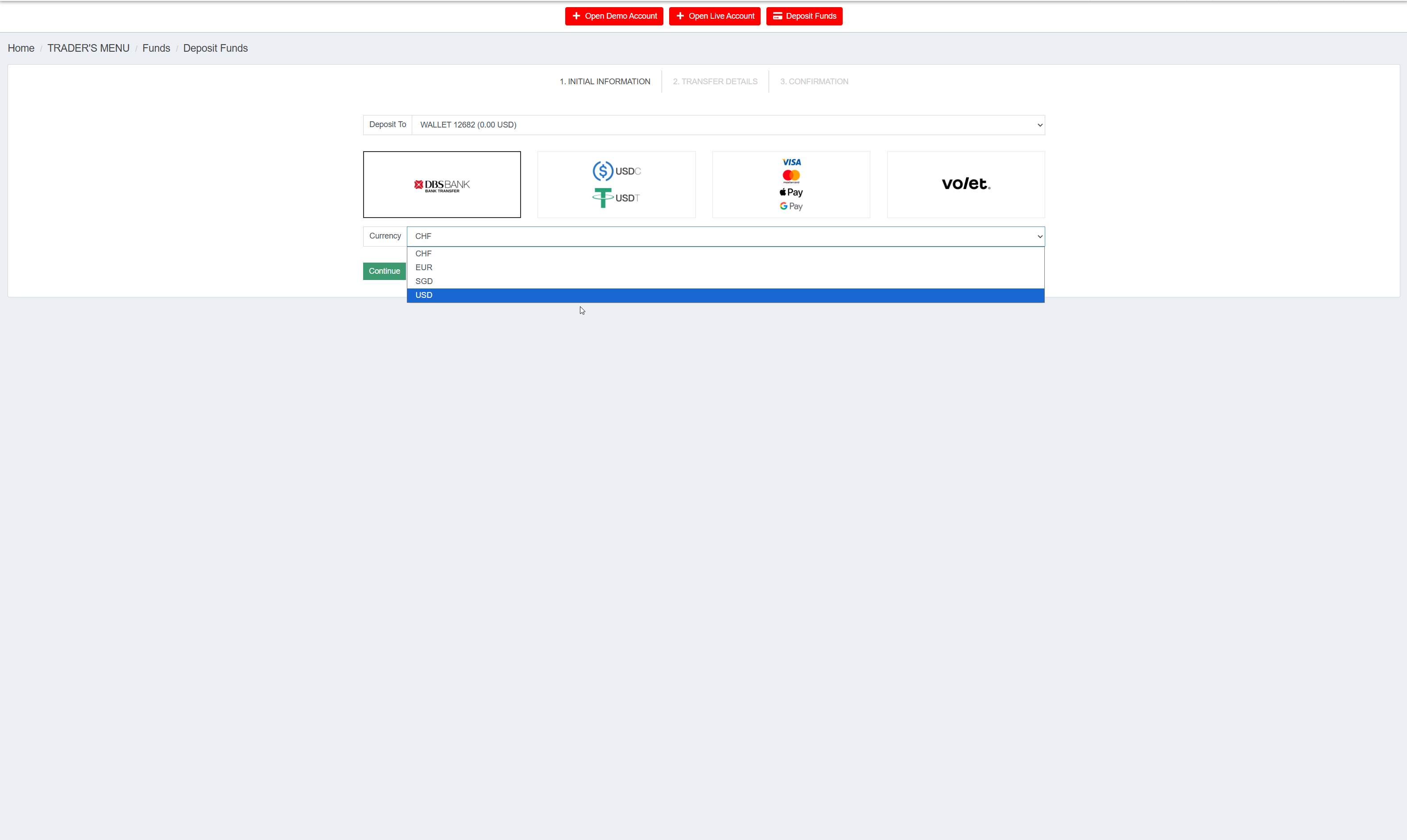
In the wizard you select the DBS BANK tile. In the first wizard step, an additional currency dropdown appears — available options are CHF, EUR, SGD, USD. Choose USD, because your target wallet is a USD wallet; other currencies would require additional conversion.
Currency selection for the DBS bank transfer. Choose USD because the target wallet is in USD.
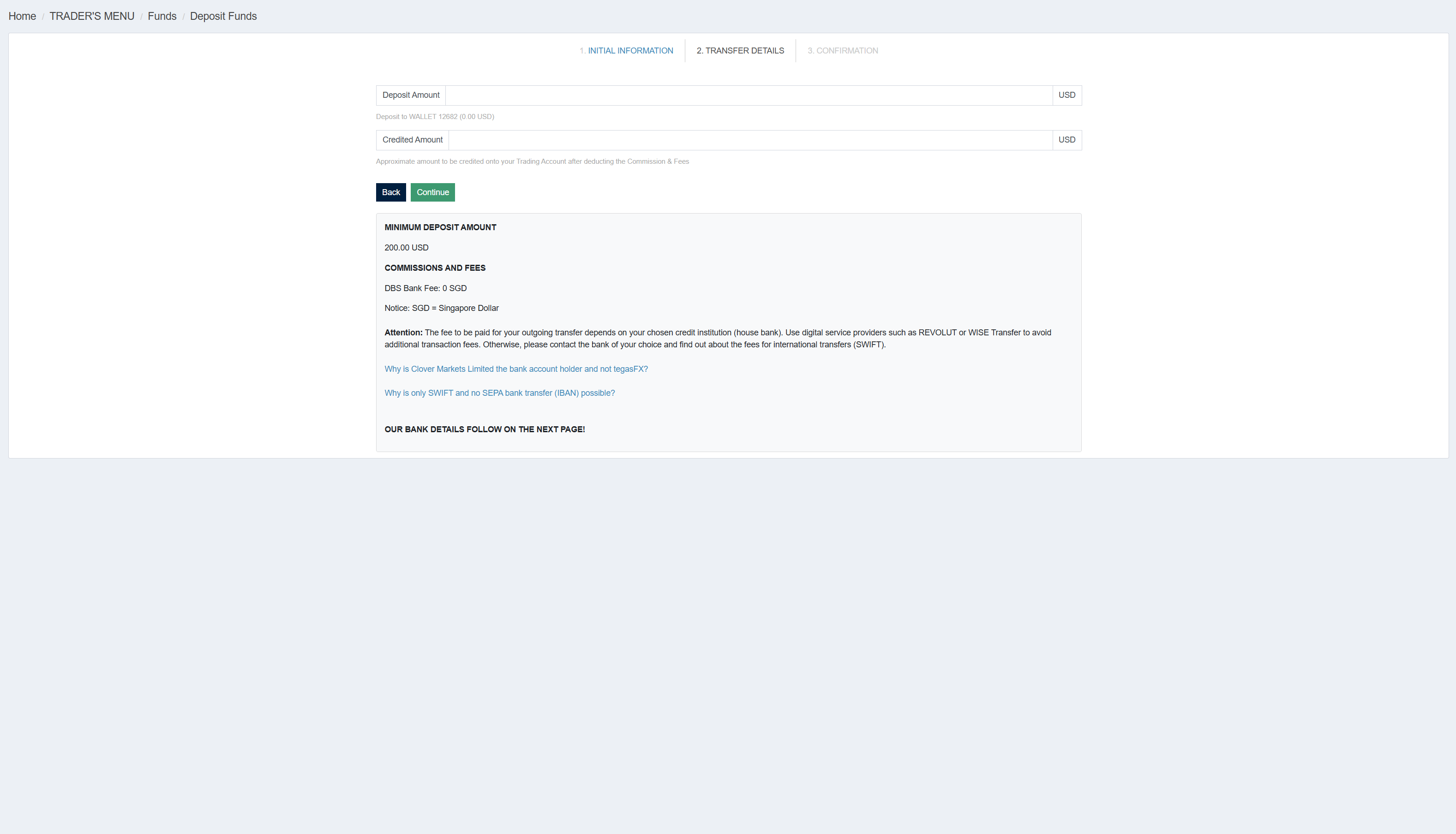
In the second wizard step you enter the desired Deposit Amount in USD. The platform shows the minimum limit ($200) on the right plus the note that the DBS bank fee is $0 SGD. Important: your own bank's SWIFT fees come on top — TegasFX explicitly recommends Wise or Revolut to avoid these fees.
Step 2: enter deposit amount in USD. Minimum $200, DBS fee $0. TegasFX advice: use Wise or Revolut for cheap international transfer.
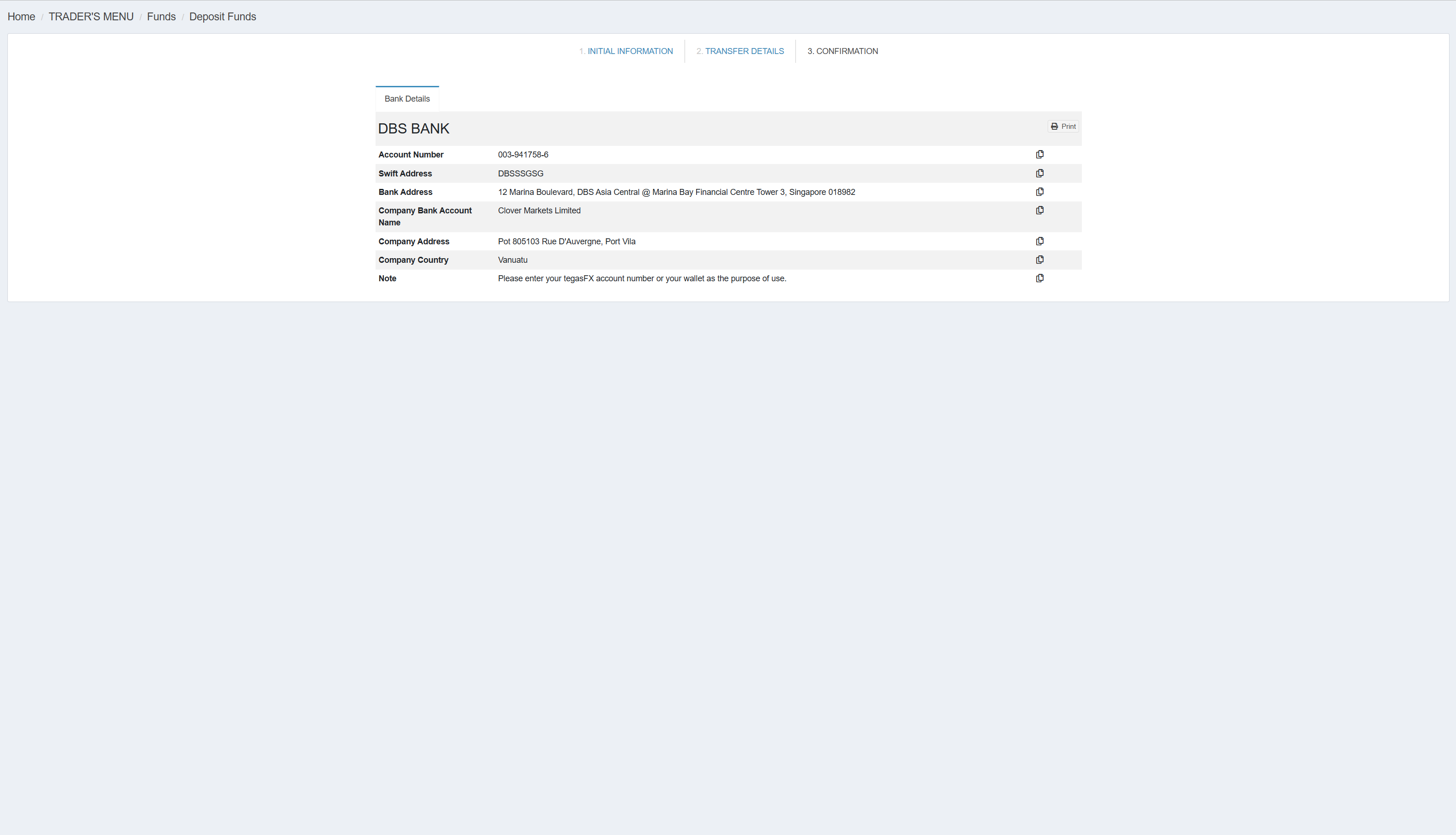
In the third wizard step, TegasFX shows the complete recipient data. You transfer this data into the SWIFT international transfer at your own bank:
RecipientClover Markets Limited
Account Number003-941758-6
SWIFT/BICDBSSSGSG
BankDBS Bank, 12 Marina Boulevard, DBS Asia Central @ Marina Bay Financial Centre Tower 3, Singapore 018982
Recipient AddressPot 805103 Rue D'Auvergne, Port Vila, Vanuatu
ReferenceYour TegasFX account number OR wallet number (e.g. 12682)
Step 3: complete bank details from the TegasFX wizard. Each field has a copy button for clean data transfer.
Why Clover Markets Limited as recipient? TegasFX is a registered trademark of Clover Markets Limited. Clover Markets Limited acts as the parent company and is the official holder of all DBS bank accounts. So this is correct — you're transferring to the right recipient. TegasFX has a direct explainer link on the wizard page ("Why is Clover Markets Limited the bank account holder and not tegasFX?") in case you need to justify it to your bank.
External part (your bank)
On your bank's website, you set up a SWIFT international transfer, take over the recipient data 1:1, and submit the transfer. The exact fields and click paths differ from bank to bank — if you're unsure, ask your banking support or your Algovaro contact.
Don't forget the reference
The reference of your transfer must contain your TegasFX account number or wallet number. Without the correct reference, TegasFX cannot allocate the payment — the credit will be delayed by days until support manually allocates.
Tip: some banks have SWIFT limits or extended security verifications for first-time international transfers. Plan for a day's buffer in case your banking support has follow-up questions.
Method 2 of 4
Crypto (USDC or USDT)
Pros
Low TegasFX fee: 1 % (min $2.50)
Seven network options — TRC20/Polygon with minimal network fees
Instant credit after 1 confirmation (~5 min on ERC20, faster on TRC20/Polygon)
No exchange-rate risk (USD stablecoin into USD wallet)
Low minimum amount: $10
No volume cap
Cons
Requires a crypto wallet
Address must be copied correctly — typos mean loss
Network choice must match the sender wallet
ERC20 has high network fees on the sender side
When it makes sense: practically always, if you already use crypto wallets. Competitive for any setup size: at small amounts because of the low minimum, at large amounts because of the flat 1 % rate without volume cap.
TegasFX-internal part
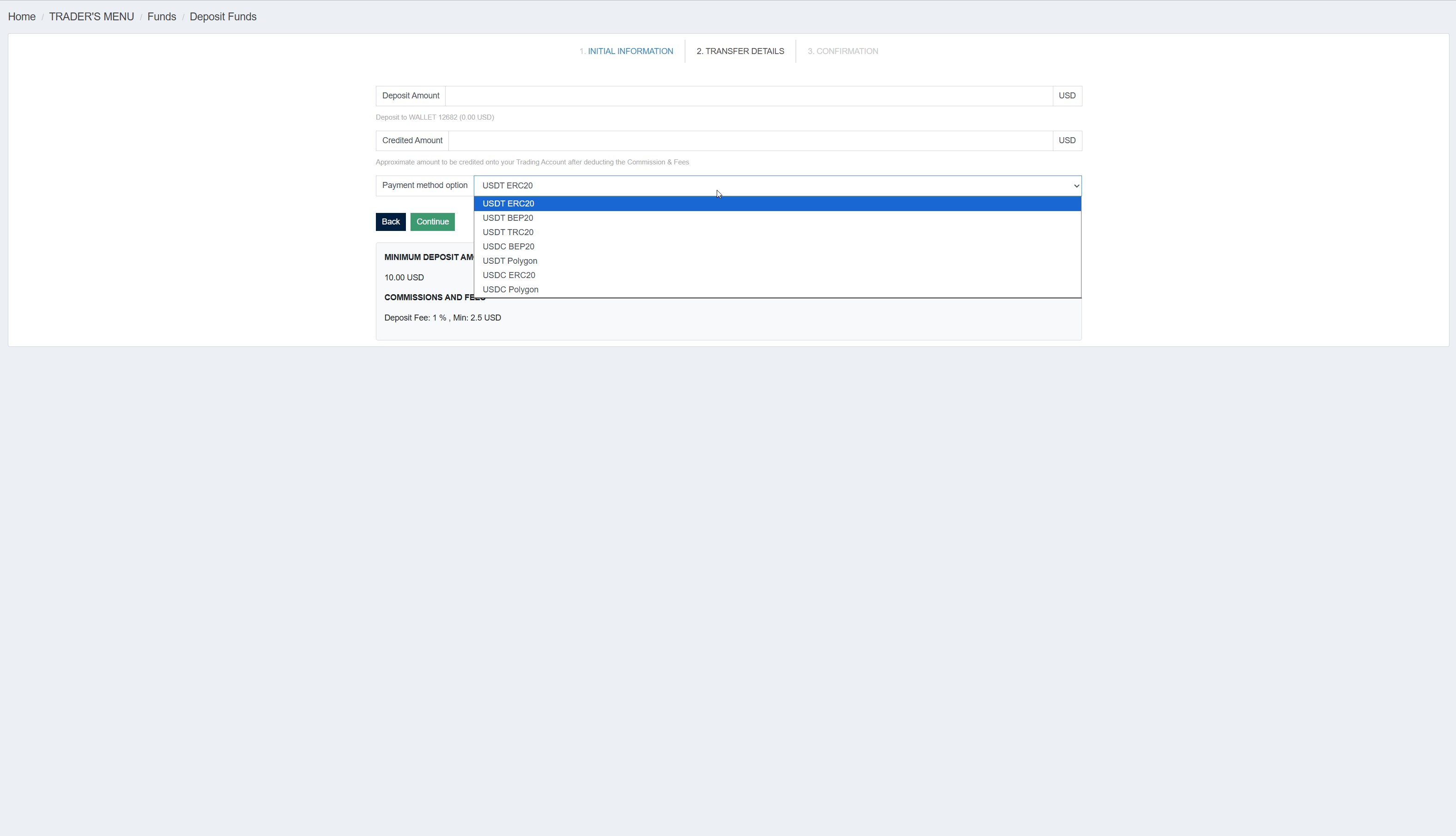
In the wizard you select the USDC / USDT tile. In the second wizard step, TegasFX shows an input field for the deposit amount plus a Payment method option dropdown with the available stablecoin-and-network combinations:
USDT on ERC20 — higher network fees on the sender side (Ethereum mainnet)
USDT on BEP20 — Binance Smart Chain, low network fees
USDT on TRC20 — TRON network, very low network fees, fast confirmation
USDT on Polygon — Polygon network, very low network fees
USDC on ERC20 — higher network fees on the sender side
USDC on BEP20 — Binance Smart Chain
USDC on Polygon — Polygon network
Step 2: seven network options for USDT and USDC. Minimum $10, deposit fee 1 % (min $2.50).
Network choice recommendation: if your wallet supports TRC20 or Polygon, use one of these — sender-side network fees are minimal (often under $1). ERC20 also works but Ethereum mainnet fees can range from $5 to $30 depending on time of day. BEP20 is a good middle ground if your wallet primarily speaks Binance Smart Chain.
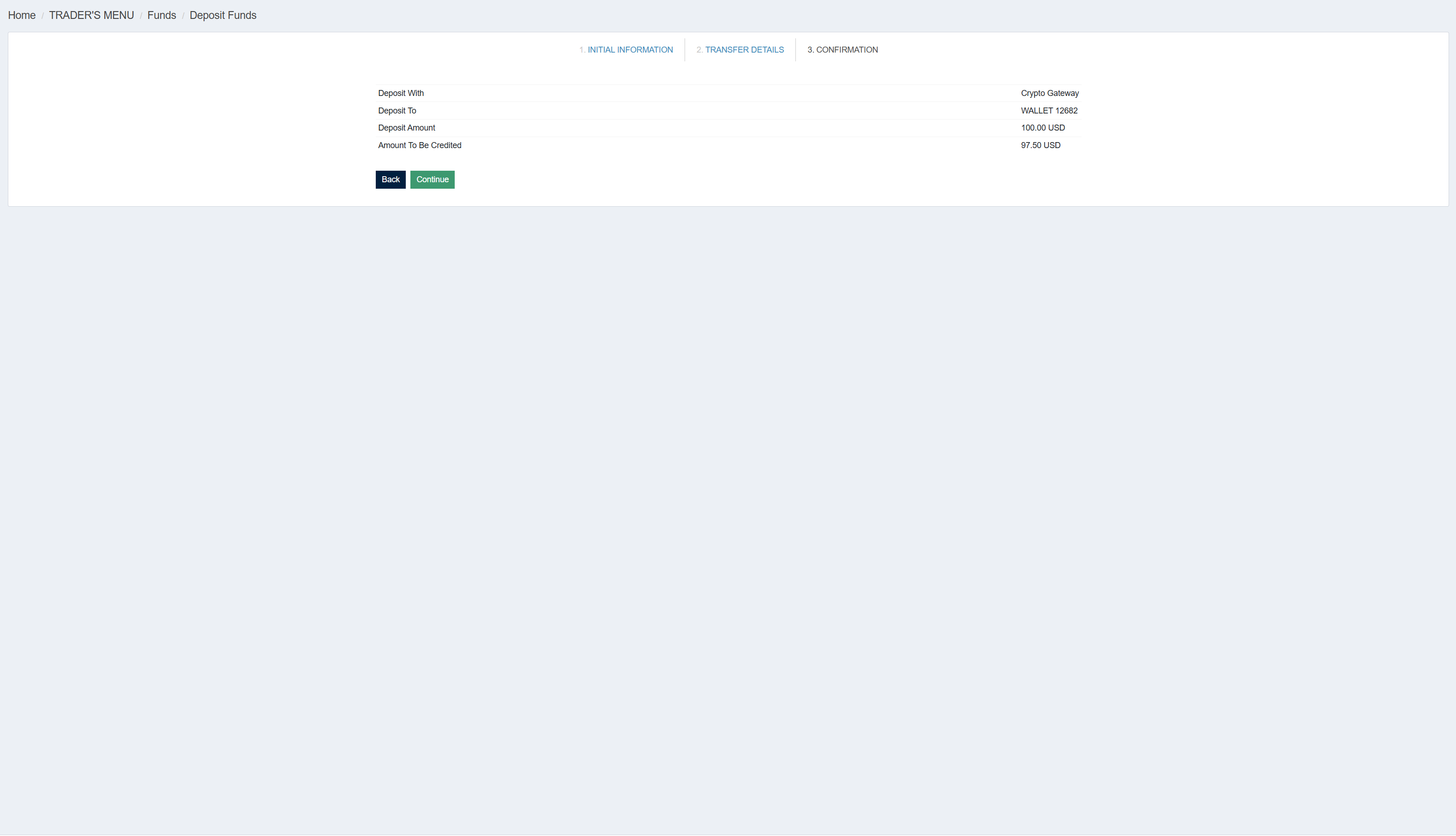
After clicking Continue in the second wizard step, TegasFX shows a confirmation page with Deposit With ("Crypto Gateway"), Deposit To, Deposit Amount, and Amount To Be Credited (i.e. deposit amount minus the 1 % fee).
Confirmation in the TegasFX wizard. For a $100 deposit, $97.50 is credited (1 % fee, since $1 is below the $2.50 minimum).
External part (crypto gateway match2pay)
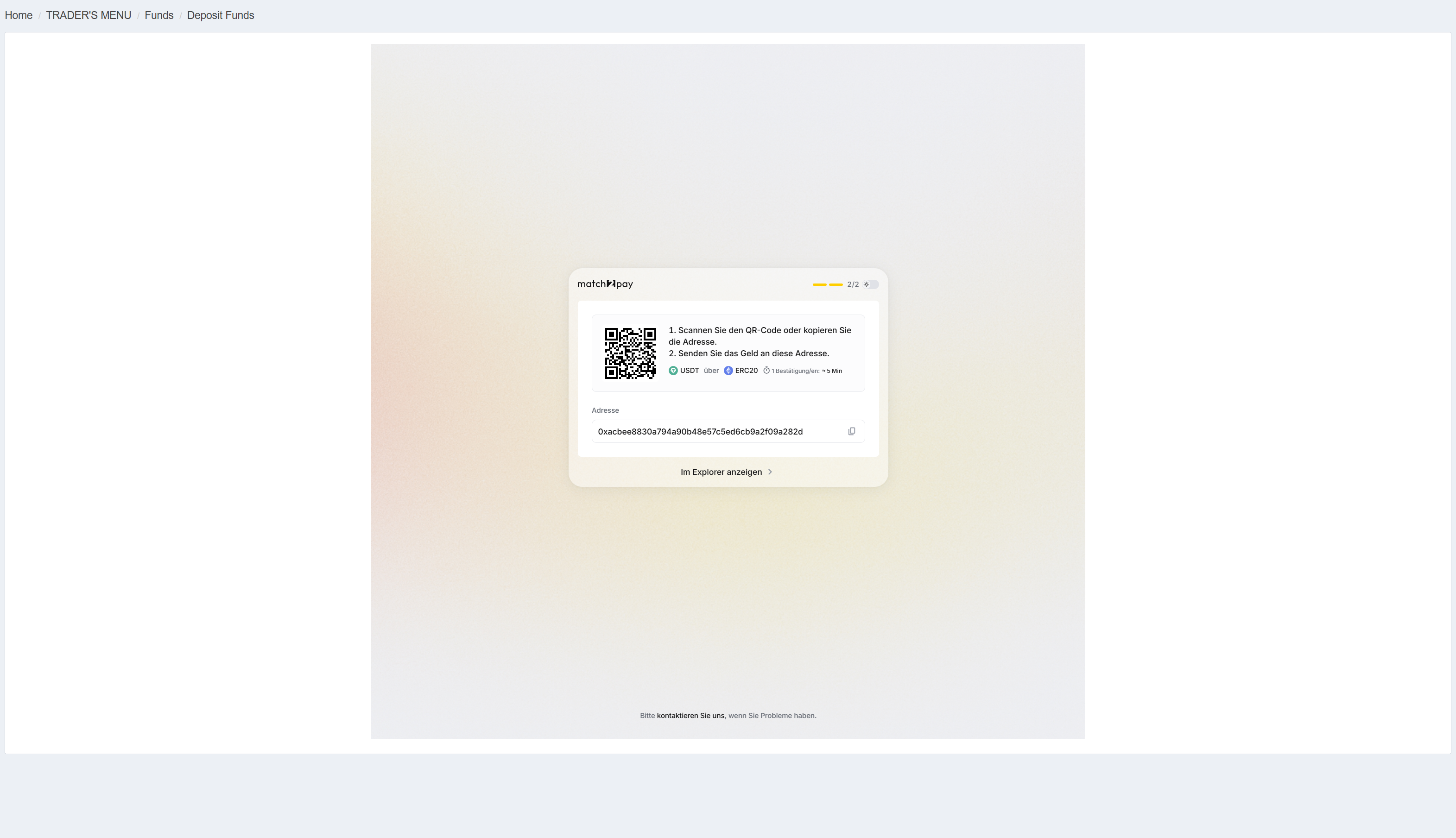
After the TegasFX confirmation, you're redirected to an external crypto gateway page — this is match2pay, the crypto payment provider TegasFX uses. There you'll see a QR code and the receiving address, plus a reminder of the chosen network and the expected confirmation time.
match2pay page with QR code and receiving address. Info block: USDT via ERC20, 1 confirmation expected, ~5 min.
You open your wallet (MetaMask, Trust Wallet, exchange app, hardware wallet, etc.), choose USDC or USDT, scan the QR code or copy the address, verify the network, and send. The exact click paths differ per wallet — if you're unsure, ask your wallet's support or your Algovaro contact.
Never type the address — never guess the network
Crypto addresses are so long and cryptic that any typo means an unrecoverable loss. Always use copy-paste or the QR code — never type by hand. Equally important: the network on your sender wallet must exactly match the selection in the TegasFX wizard. If you send via TRC20 but TegasFX has an ERC20 address, the coins are lost in transit.
Method 3 of 4
Card payment (VISA, Mastercard, Apple Pay, Google Pay)
High fee — we recommend this method only as a last resort
Card deposits cost 9 % of the deposit amount plus $0.60 fixed cost. That's significantly more expensive than all other methods. For every $100 deposit, only $90.40 is credited — the rest is platform fee. We recommend this method only if you have no other option: no crypto wallet, no SWIFT-capable bank, no Volet account.
Pros
Instant credit
No additional setup required
Apple Pay / Google Pay very convenient on mobile
Cons
9 % + $0.60 fixed cost — highest fee of all methods
Maximum $20,000 per transaction
Card may require 3D-Secure verification
Often initially declined for international transactions
When it makes sense: rarely as a first choice. Acceptable when fast deposit is the absolute priority and the high markup is consciously accepted, or when no other method is available.
TegasFX-internal part
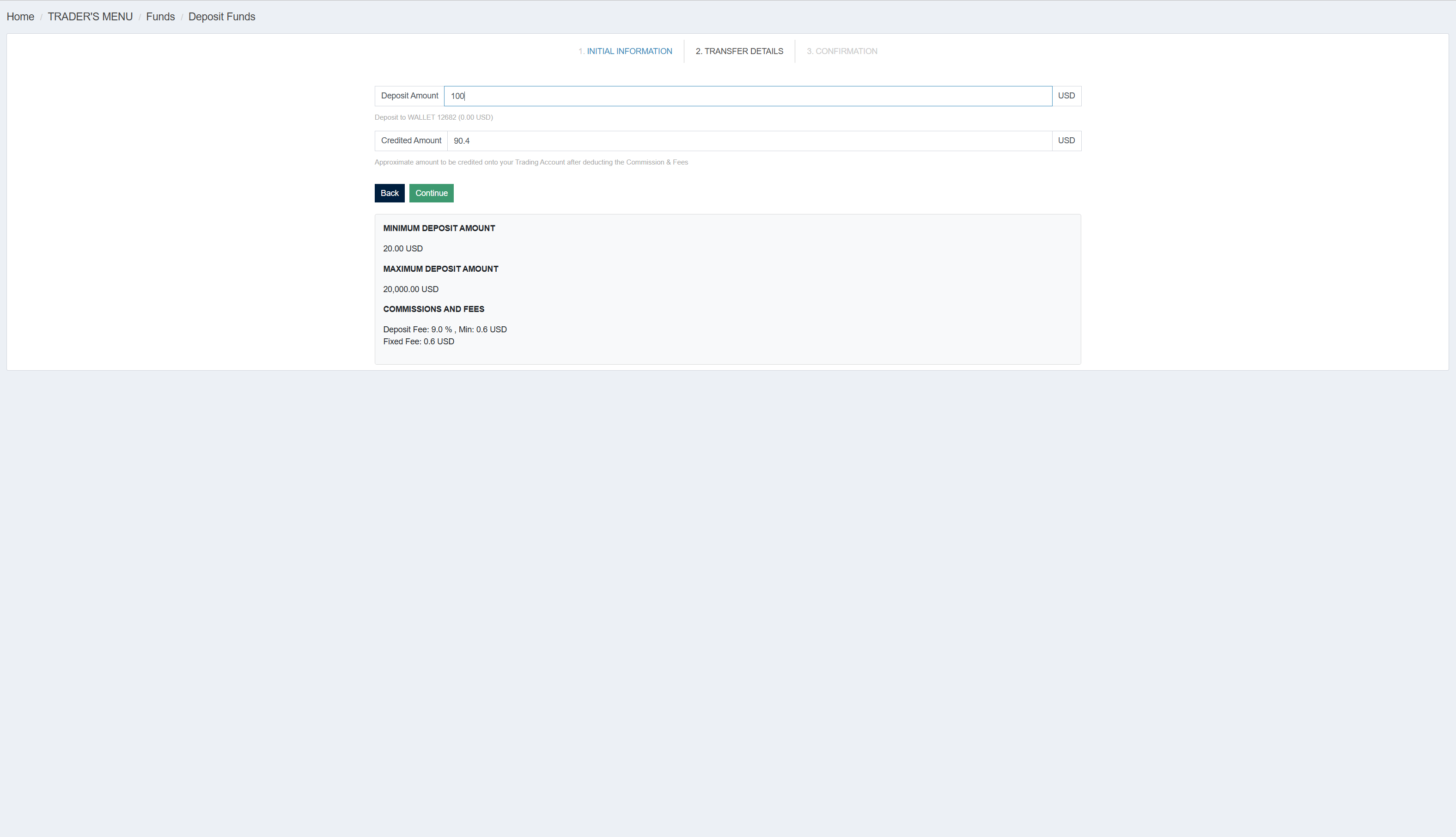
In the wizard you select the VISA / Mastercard / Apple Pay / Google Pay tile. In the second wizard step, the deposit amount input field appears. Right below it, TegasFX shows the calculated credited amount in real time — with the deliberate gap: at $100 deposit, that's $90.40 credited.
Step 2: at $100 deposit amount, only $90.40 is credited. Minimum $20, maximum $20,000.
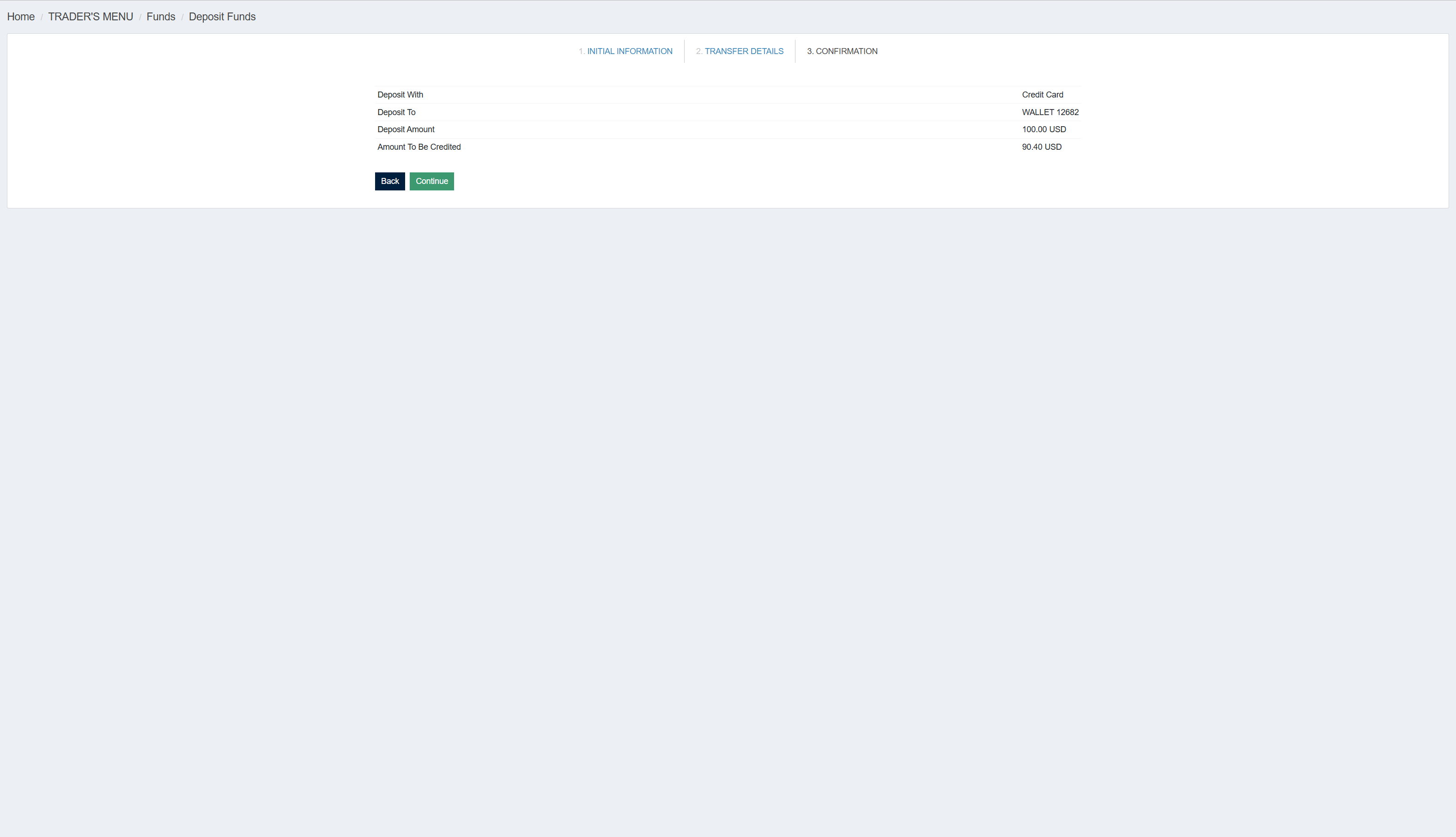
The confirmation page then shows Deposit With ("Credit Card"), Deposit Amount, and the final Credited Amount.
Confirmation: Deposit Amount $100, Amount To Be Credited $90.40.
External part (your bank)
After Continue, you reach the card data entry. With VISA/Mastercard, an input form for card data opens and you'll typically be redirected to your bank's 3D-Secure page (SMS code, banking app confirmation, or push notification). With Apple Pay or Google Pay, the selection is delegated to your device — you authenticate directly in the Apple/Google wallet.
Tip: if your card transaction is declined, it's usually a security block by your bank for international transactions. Call your banking support briefly and authorize the transaction — the second attempt is typically successful.
If you do pay by card — calculate the amount correctly
If you want to fund a specific setup-investment (e.g. $299 for the $3,000 funded account), you need to deposit considerably more due to the 9 % fee. Concretely: for $299 in the wallet, you need to deposit roughly $330 by card. Rule of thumb: divide the setup amount by 0.91 and round up to the next $10 to leave a buffer.
Method 4 of 4
Volet (formerly AdvCash)
Pros
Instant credit if you have a Volet account
Full credit: $100 deposit = $100 in the wallet (fees charged on the Volet side)
When it makes sense: if you already use Volet — for example if you're active in crypto/trading communities. Opening and funding a Volet account just to deposit into TegasFX is more cumbersome than the direct methods crypto or bank transfer.
TegasFX-internal part
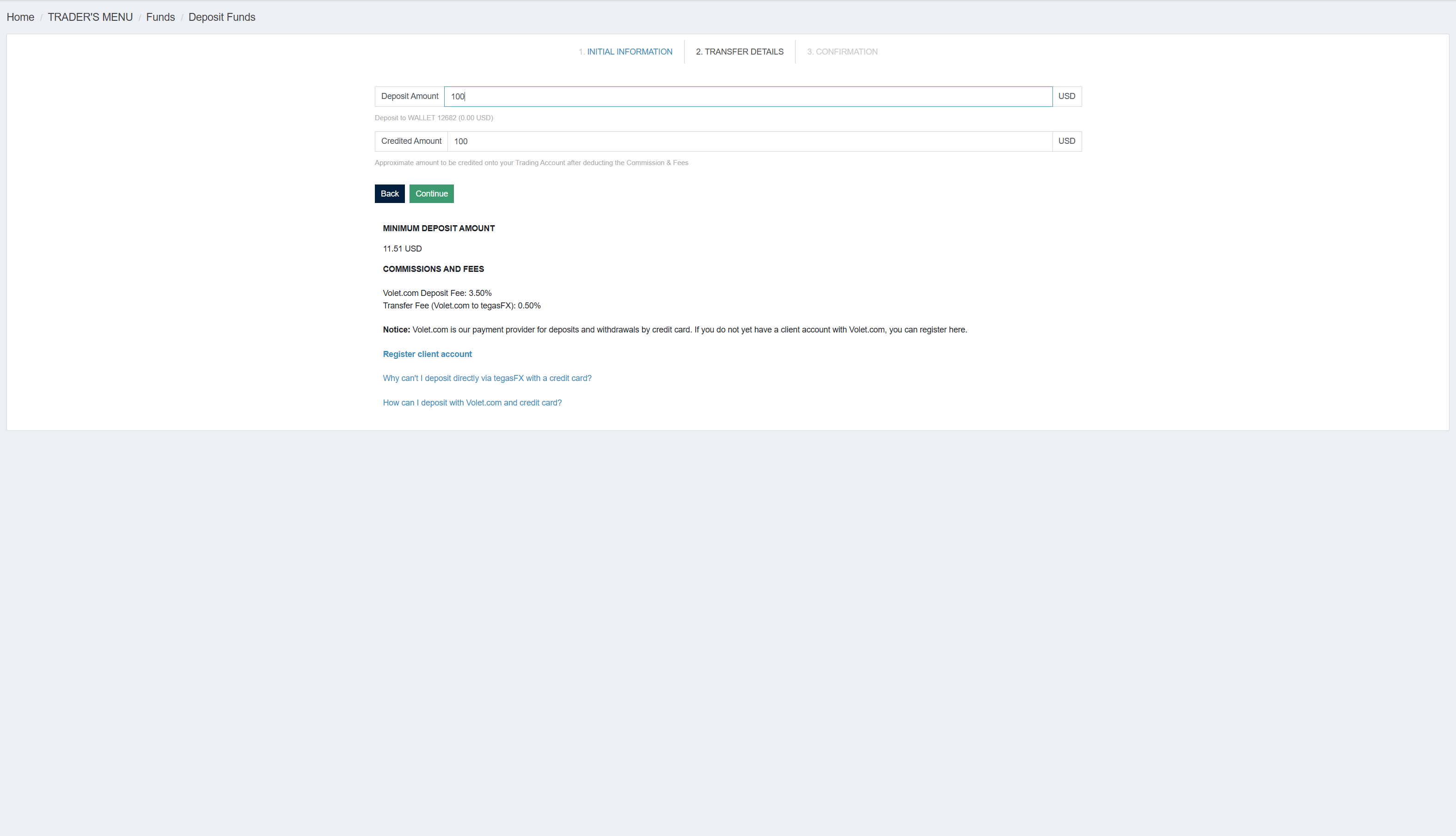
In the wizard you select the volet tile. In the second wizard step, the deposit amount input field appears. Unlike card or crypto, the credited amount here shows the same amount: $100 deposit becomes $100 credited. That's because the fees are charged on the Volet side, not deducted by TegasFX.
Step 2: at $100 deposit, $100 is credited. The effective ~4 % markup arises on the Volet side (3.50 % Volet fee + 0.50 % transfer fee).
Where does the ~4 % markup come from? TegasFX shows in the info block: "Volet.com Deposit Fee: 3.50 %" plus "Transfer Fee (Volet.com to tegasFX): 0.50 %". That means: if you want $100 in your TegasFX wallet, you'll spend roughly $104 on the Volet side. The exact amount depends on which Volet-internal method you use to fund the payment.
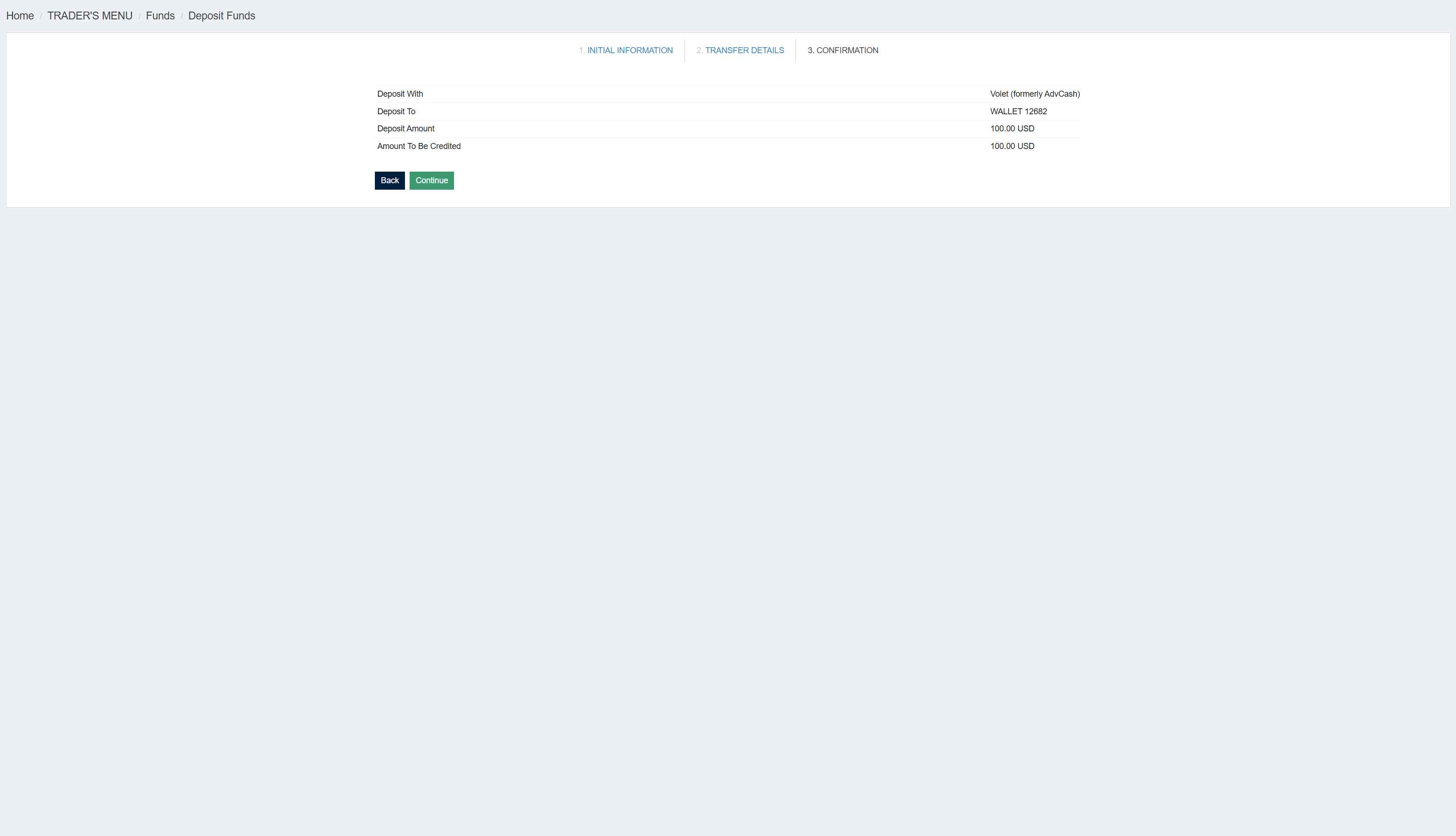
The confirmation page then shows Deposit With ("Volet (formerly AdvCash)") and the full credited amount.
Confirmation: Deposit With "Volet (formerly AdvCash)", Amount To Be Credited $100.00 (full amount).
External part (Volet platform)
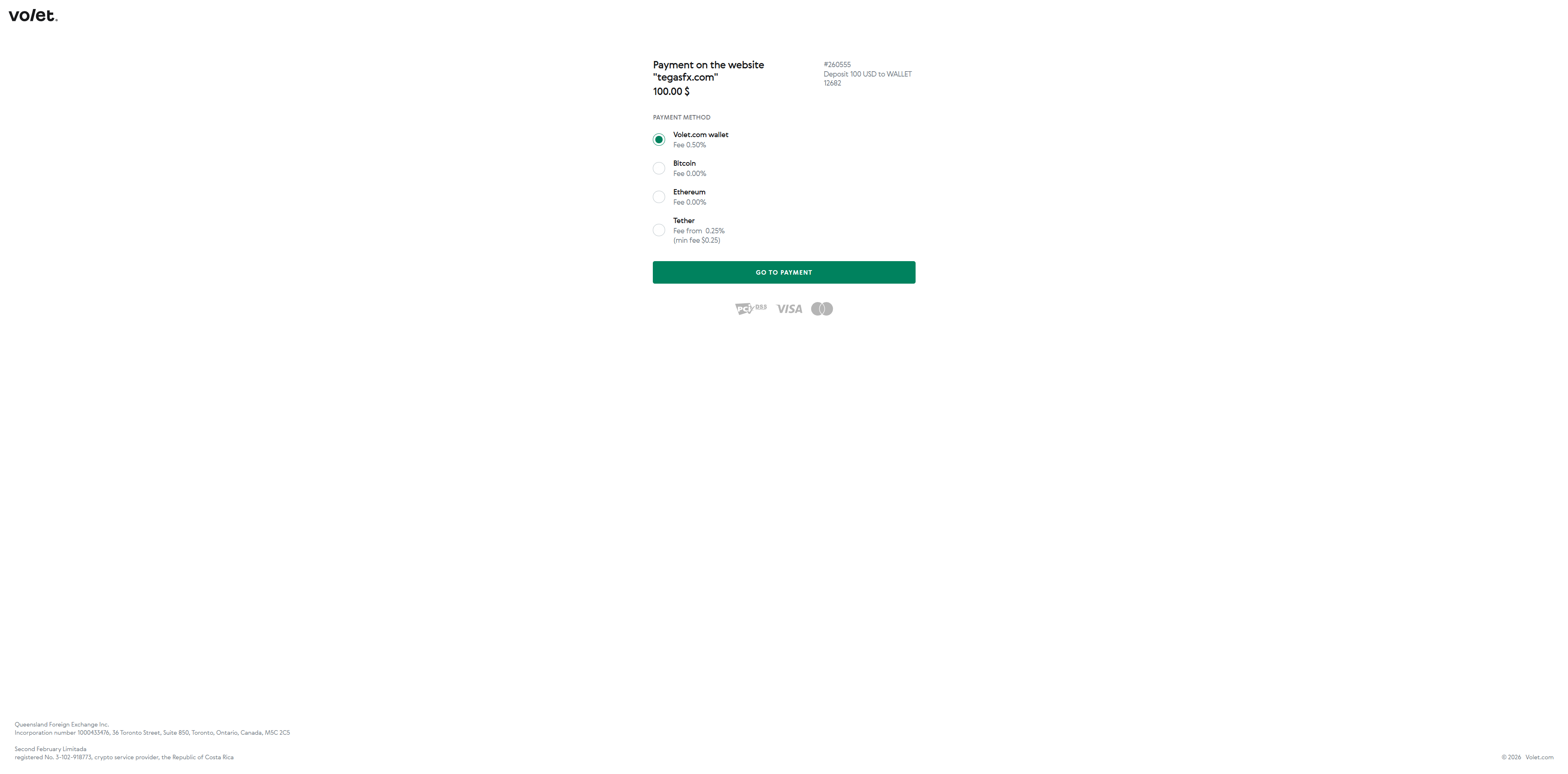
After Continue, you're redirected to the external Volet page where you log in with your Volet credentials. Volet shows a selection of internal payment methods to fund the amount:
Volet.com wallet — if your Volet wallet already has balance. Fee 0.50 %.
Bitcoin — Fee 0.00 %, but your BTC wallet's network fee applies.
Ethereum — Fee 0.00 %, but your ETH wallet's network fee applies.
Tether — Fee from 0.25 % (min $0.25), plus network fee.
External Volet page: four internal payment methods with different fees. PCI-DSS, VISA, and Mastercard as trust logos.
Your choice of internal Volet method determines your actual markup. Cheapest path in practice: Volet.com wallet with your own balance. If you'd have to fund Volet first, the method is barely competitive with direct crypto deposit anymore.
Note: if you don't already use Volet, the direct route via crypto or bank transfer is the simpler and usually cheaper path — Volet account setup plus Volet funding plus TegasFX deposit are three steps, the direct methods are two.
Once your deposit is credited
As soon as your USD wallet shows the desired balance, you can purchase the funded account. Back to the setup tutorial:
DBS bank transfer doesn't arrive. Wait two to three business days first. Most common cause: wrong or missing reference (TegasFX account number or wallet number not included). TegasFX cannot allocate the incoming payment unambiguously and the credit is delayed until support manually allocates. With DBS Singapore, compliance checks can also delay the credit, especially for first-time transfers or larger amounts. For delayed credit: message your Algovaro contact.
Your home bank rejects the SWIFT transfer to Singapore. Some banks — especially smaller branch banks — have SWIFT limits for first-time international transfers or require extended identification. Then: either ask your home bank to raise the limit, or use Wise/Revolut (which TegasFX recommends anyway). Wise/Revolut are significantly cheaper especially for Singapore transfers.
Crypto transaction sent on wrong network. If you send via TRC20 but the TegasFX address is for ERC20 (or vice versa), the coins are lost in transit. Contact your Algovaro contact immediately — some cases can be recovered through match2pay/TegasFX support, but not all. Prevention: before sending, double-check the network in both the TegasFX wizard and your sender wallet.
Crypto address typed instead of copied. Even a single wrong character = unrecoverable loss. There's no recovery. Always use copy-paste or the QR code.
Card declined. Call your bank, authorize the international transaction, then try again. If still declined: switch to another card or rather to a cheaper method (crypto costs 1 % instead of 9.6 %).
Volet authentication fails. Check your Volet login credentials in a separate tab. If Volet itself is unreachable, wait briefly or choose another method.
Wrong wallet currency (EUR instead of USD). TegasFX can transfer between wallets — with a conversion fee. Message your Algovaro contact, they trigger this through support.
Setup-investment doesn't match wallet balance. If your USD wallet shows less balance than the setup-investment price (typical after card deposit due to the 9 % fee), you need to top up. Either use the same method again, or switch to a cheaper method.